Where the PTSO has enabled the feature, District Administrators may approve teams in bulk rather than individually.
NOTE: To be eligible for bulk approval, teams must have been submitted to the District.To approve teams in bulk:
- Navigate to the Teams page in the Govern Navigation menu on the left.
- Use the filters to narrow the list of teams as needed (e.g. by club, or by status)
- Check the box to the left of each team name that you want to include in the bulk approval.
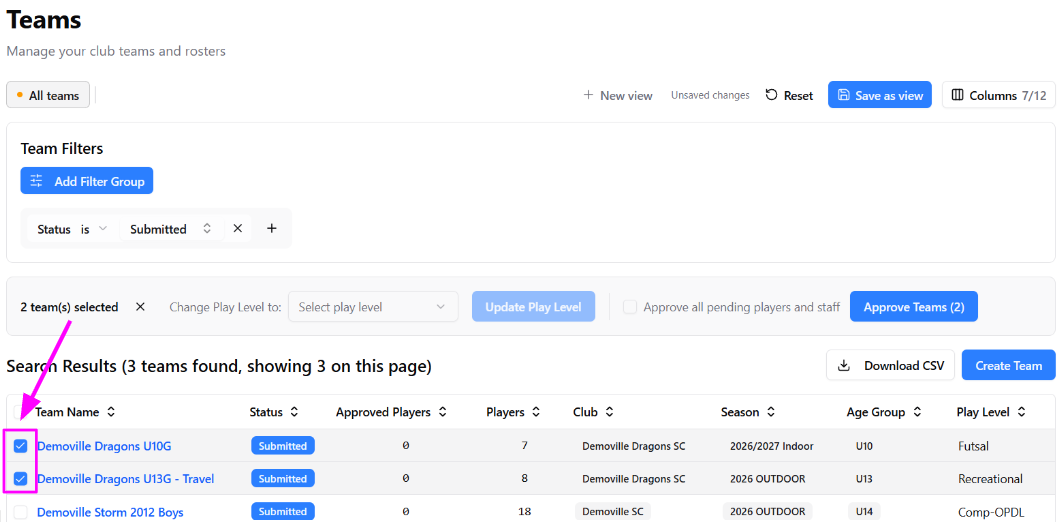
- Options for approving will appear above the list of teams. Click the Approve Teams (#)button (shown below with an arrow) to complete the bulk approval.
- IMPORTANT NOTE:
If you wish to ALSO approve all pending players/staff on the selected teams, you must also check the “Approve all pending players and staff” box (indicated in the screenshot below with a pink box).
Reminder that players and staff must be approved in order for them to appear on official approved rosters.
- IMPORTANT NOTE:
If any selected teams are not eligible for bulk approval, a note will appear. You can click the Details option on the right side to get more information on why they aren’t eligible.

Was this article helpful?
That’s Great!
Thank you for your feedback
Sorry! We couldn't be helpful
Thank you for your feedback
Feedback sent
We appreciate your effort and will try to fix the article