NOTE: This article contains instructions for allowing a player to a new roster in the same club. Where a player is moving to a different club, a de-registration would likely be required instead.
Occasionally a club may need to move a player who has already been approved by the District to another team within their club. This requires assistance from the District administrator, since a club admin cannot remove an approved player from a roster.
To allow a club to remove an approved player from a roster:
- While logged in as a District Administrator, navigate to the Team Roster where the player is currently rostered.
- Find the player in the list and in the column on the right side of the page, click the three dots.
- Click the Unapprove option.
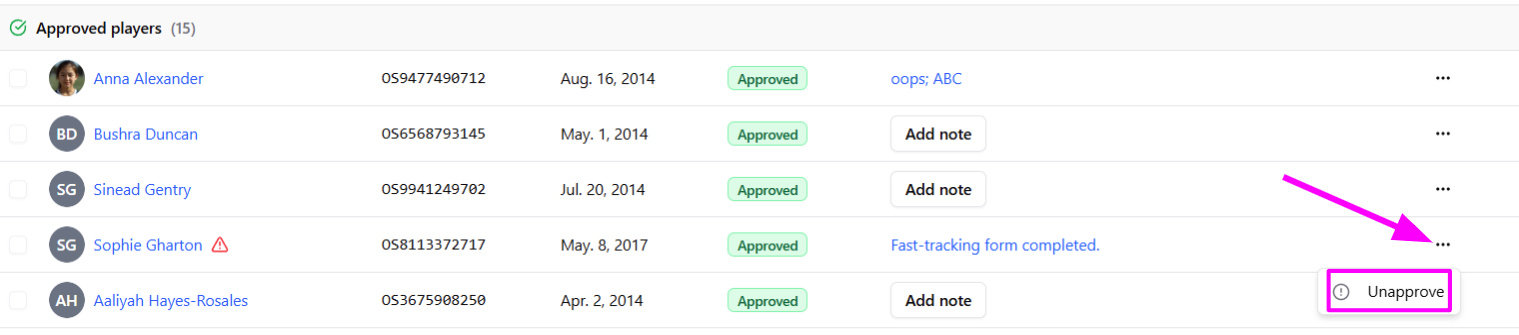
This will remove the approval for the player, and the status will be set to Rejected.
Once the status has been changed from Approved to Rejected, the Club will be able to reset the status to Pending. While a player is pending, they can be removed from the team using the checkbox to the left of their player photo.
Was this article helpful?
That’s Great!
Thank you for your feedback
Sorry! We couldn't be helpful
Thank you for your feedback
Feedback sent
We appreciate your effort and will try to fix the article